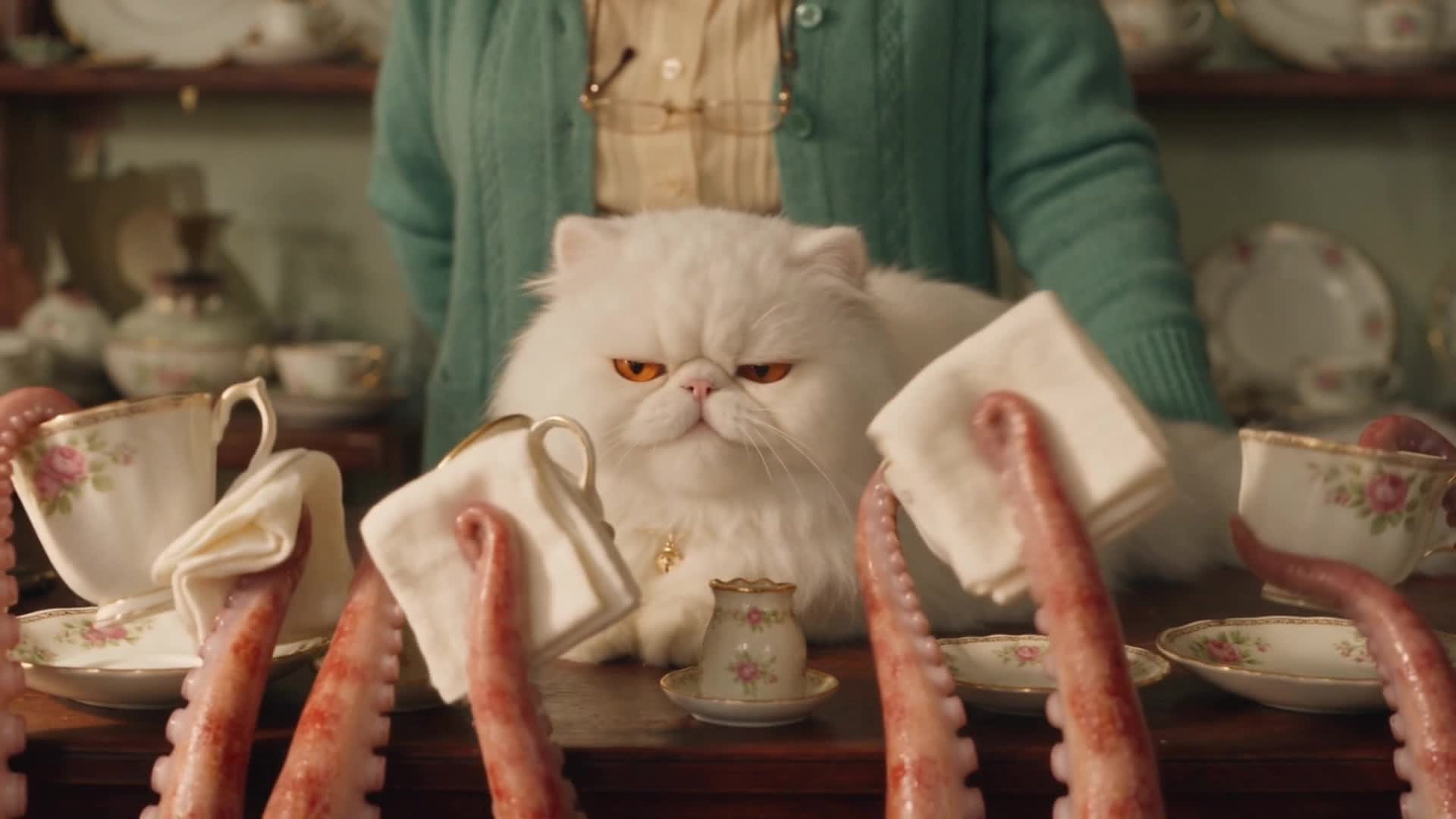
The first scene came back perfect. The second came back set in a different building, with a different cat in it, at a different time of day.
That is the thing nobody warns you about. Every clip you generate starts from nothing. The model has no memory of the room it built you ninety seconds ago, or the cardigan the shopkeeper was wearing, or where the light was coming from, or what anybody sounded like. It will hand you thirty gorgeous seconds and then thirty more that share nothing with them. Anything that carries across, you carried.
This is how I made the first episode of Handle With Care, a film about an octopus who works in a china shop. Nineteen generations, one minute fifty-three of finished film, and a fortnight of learning the same lesson over and over in slightly different costumes.
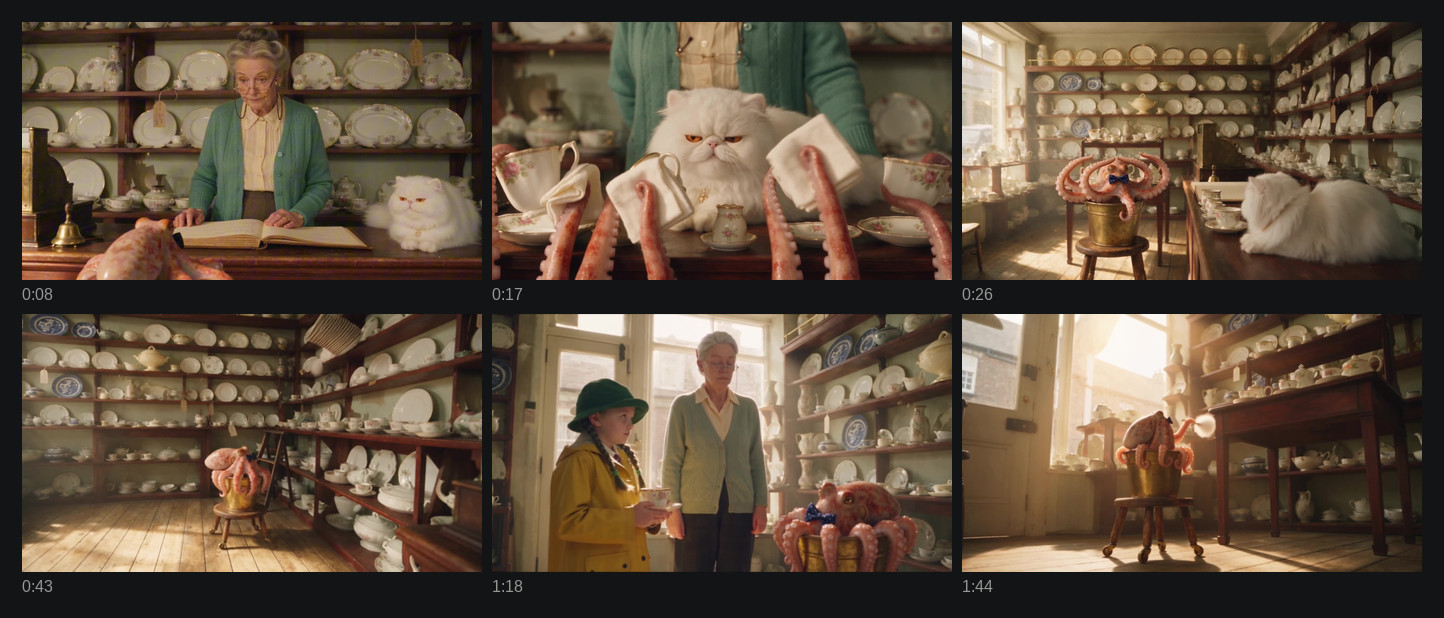
Six moments spread across the whole film, generated separately over about two weeks. Same room, same shelves, same octopus, same light.
If you have never generated a clip before, start here and come back.
Who does what
I direct. Claude operates.
That split matters for reading the rest of this, so I want it said up front. I decide what a scene is, whether a clip is any good, what the octopus is feeling, and when somebody drops something. Claude does the building. It sets up the workflow, attaches the reference pictures, writes and sends the prompts, and runs the checks, because it is plugged into WunderNode directly and can work the canvas rather than just describe it.
So when I say later that you should check the pitch of every line to catch a swapped voice, I am not telling you to go and write software. I didn’t write any. I asked for the answer and looked at it. Trimming a voice sample out of a finished clip, working out where the model chose to cut, going back through the files on my disk to count what actually happened, all of that got done by asking.
Read the checks below as things to ask for, not things to build. The judgement is the part you cannot hand over. The fiddly mechanical part, you can.
Write the film before you generate anything
Thirty seconds is the length to think in. Seedance 2.5 will generate up to thirty seconds in one go and cut between different shots inside that window by itself, so what you should be generating is a whole scene with a beginning, a middle and an end. Anything shorter and you are making offcuts you will have to find a home for later.
Give each scene somebody who wants something, something that makes it harder, and a last moment that lands. Give the whole film one big turn rather than three.
And go easy on the dialogue. This episode has eighteen lines in under two minutes, which I now think is about eight too many. More on why in the episode two notes.
Make your reference pictures first
Three kinds, and they are the whole reason clip two looks like clip one.
A sheet for each character
One picture per character showing them from several angles at once, with every detail of how they look pinned down identically in each view.
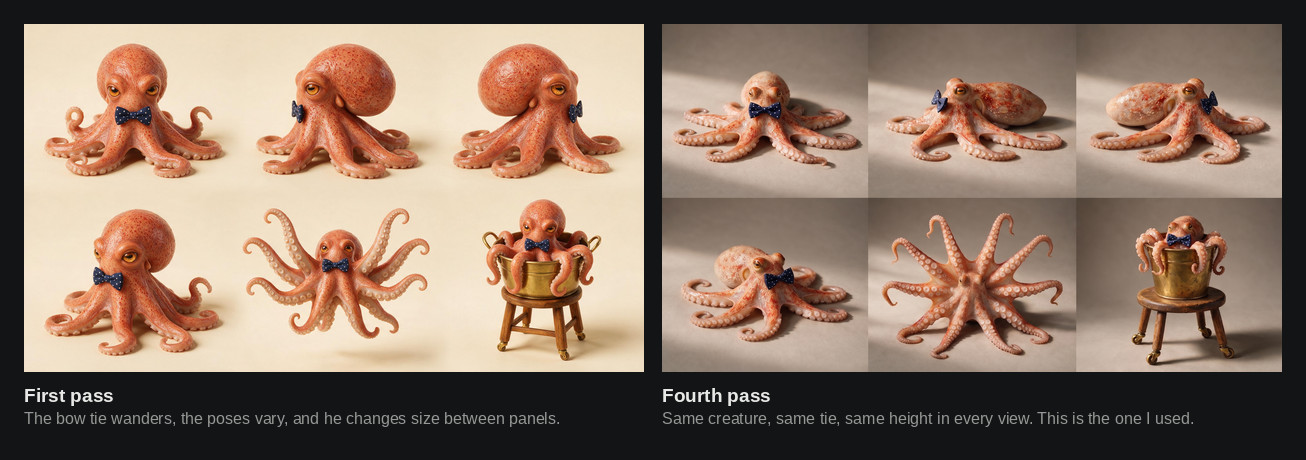
Four passes before that sheet was usable. On the first one the bow tie turned up in his mouth in a single panel, and from then on the model treated its position as a suggestion and put it wherever it fancied. One wrong panel is permission to improvise.
So say “the exact same X in every view” out loud as you write the prompt, then check the finished sheet panel by panel before you let it near anything. This is the shape I use, in this case for a small boy who turns up in the second episode:
Character reference sheet for film production, six views of the SAME small boy,
arranged in two rows of three on a plain warm grey background. Every view is full
body, evenly lit.

The boy is four years old, small, round-faced, fair skinned with pink cheeks and
short dark brown curly hair. He wears a bright red wool duffle coat with a hood
lined in brown corduroy and three wooden toggle fastenings.

The exact same bright red hooded duffle coat with the exact same three wooden
toggles in every view. The exact same yellow wellington boots in every view. The
same face, the same dark curly hair, the same height in every view.

VIEW 1: front, standing, arms at his sides.
VIEW 2: left side profile, standing, facing the left edge of the frame.
VIEW 3: right side profile, standing, facing the right edge of the frame.
VIEW 4: seen from a low camera placed on the floor looking up at him.
VIEW 5: back view, standing.
VIEW 6: mid-run, front three-quarter, one boot off the ground.

Photorealistic, 35mm cinematic feel, soft even studio light. No lettering.
Keep these sheets to how the character looks. Anything they carry gets its own picture, because an object held in six different views will quietly swap hands in one of them and vanish out of another.
Faces were the one genuinely hard part here. Back when I made this, Seedance refused most photoreal human faces outright, and getting the shopkeeper through took a mesh overlay trick I wrote up separately. That is no longer necessary. Faces pass now and sheets attach directly, which removed a whole afternoon from the process.
A photo of your set
A still picture of your location, lit the way your film is lit, with your characters standing where they start the scene. One for each camera position. Film crews call these plates, and I have kept the word out of habit, but a photo of your set is all it is.
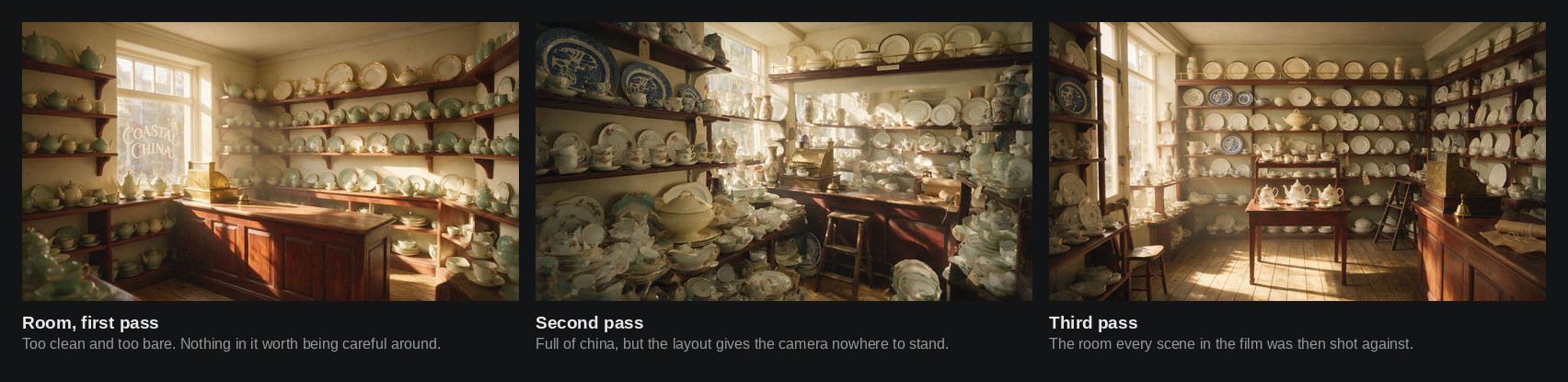
Three passes at the room before I shot a frame of the film in it. The first was too bare to be worth being careful in, which matters when your whole story is a creature trying not to break things. The second had the china but boxed the camera in. The third is the room, and every scene in the finished film was generated against it.
That hour is the highest-value hour in the whole process. Still pictures come back in seconds where video takes minutes, so every problem you can move out of a video and into a photo is one you get to solve while you are still thinking about it.
A frame from the end of each scene
Once a scene is approved, keep its final frame. Attach it to the scene that comes next.
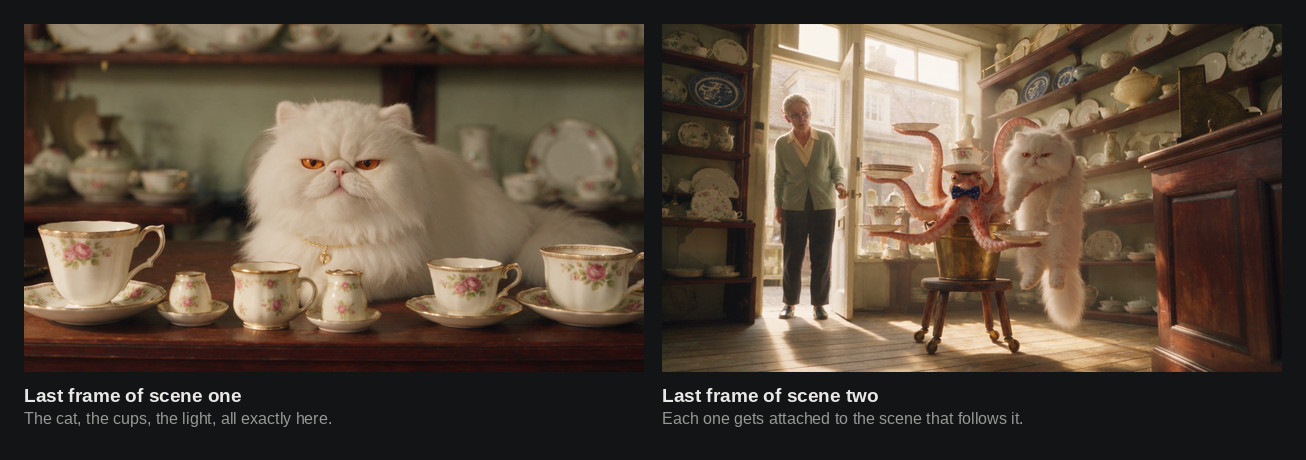
This is what stops your film drifting across its own running time. The cat is in that spot, the light is at that angle, the cups are stacked like that, and the next scene starts from those facts rather than from your description of them.
Anything that matters goes in a picture
Every fact about physical space that I ever tried to state in words got reinvented. Where the door was. Which way somebody was facing. Where the light fell. How a character was sitting. Every single one held the moment it went into an attached picture, and drifted every single time it lived only in the prompt.
Which means the set photo carries more than the furniture. It carries the light, because a clip inherits the light of whatever picture is attached to it, no matter what your prompt says about the mood. And it carries how your characters are standing when the scene opens, which is the one that catches everybody out. My octopus sheet shows him with his arms fanned out, so he began every clip mid-performance until I made a set photo with his arms down. Nothing I wrote ever fixed it.
The corollary, which cost me a whole scene on the second episode, is that a new set photo has to be checked against your actual footage rather than against the last picture you made. Drift piles up invisibly when you only ever compare each new picture to the one before it. That story is in the episode two notes, because it is a good one and it is not this film’s.
Never ask for a wider view
“Make one wider photograph” sounds like a small edit and is actually an instruction to start again. It rebuilt my shop from scratch every time I tried it. Shelving turned into a dresser, a brass till disappeared, a long narrow room came back short and wide.
When you need a wider angle, find or make a picture that already has it, then edit inside that one with the camera nailed down:
Reproduce reference image 1 pixel-for-pixel: identical camera, identical framing,
identical crop, identical lens, identical light. DO NOT MOVE THE CAMERA AND DO NOT
WIDEN THE SHOT.

CHANGE EXACTLY ONE THING: [the single change]
One change per edit. Ask for two at once and it starts rearranging the room. Do them one after another instead, checking each time.
Write the prompt as a numbered list of shots
Describe a scene as flowing prose and you get one long unbroken shot that slowly melts. Number the shots and give each one a start and end time, and you get real cuts, landing where you put them. Across every clip I have measured, the cuts arrived within half a second of the time I asked for.
SHOT 1 (0-4s) WIDE, locked off, exactly the framing of @Image 1. The boy runs in
from the street through the open doorway and out across the shop floor.

SHOT 2 (4-9s) WIDE, exactly the framing of @Image 1. He runs from left to right
ACROSS THE FRONT OF THE TALL SHELVES OF CHINA, close to the camera, big in frame.

SHOT 3 (9-13s) MEDIUM on the octopus, three-quarter, at his own height, all arms
hanging down over the rim of the bucket. HOLD THIS ONE FRAMING FOR THE WHOLE FOUR
SECONDS, with no cutting away and no cutting back.
The octopus says, in the voice of @Audio 1: "Don't run."
Eight to twelve shots per thirty seconds. Fewer than eight and it drags.
Name one thing that moves in each shot. It stops the picture wandering. Point that rule at a person, though, and you get a shop dummy, so everybody on screen still needs small constant movement, written in as something happening on top of whatever else you asked for.
Say what is touching what, and keep it touching. This is the one that ate my second scene. It is thirty seconds of an octopus lifting a plate onto a shelf, and it took eight goes, because in take after take the plate did not read as held. It hovered near an arm. Once I wrote the contact itself into the prompt, naming which arm was gripping which edge of the plate and never letting go of it, the shot worked on the next attempt.
Say how heavy falling things are. Heavy, picking up speed, tumbling at different rates. Leave it out and everything drifts down like a feather, which is a particular problem when the entire premise of your film is that china is fragile.
Then the smaller rules:
- Say what you want, never list what you don’t. Naming the thing you want gone summons it. A prompt banning denim produced jeans.
- Keep the camera back during dialogue. Hold tight on a face while it talks and the model will graft a mouth onto a character that should not have one.
- Count things out loud. “EXACTLY SIX teacups”, “EXACTLY ONE white cat”. Leave it vague and objects multiply.
- Say what is holding things up. A microphone described as being in the shot arrived floating in mid-air with nothing under it. Describe equipment from the floor upwards, with its feet in the picture.
- Don’t give it two instructions that fight. “He leaps up” plus “he stays in his bucket” gets you levitation.
Getting the voices to stay the same
You don’t need a voice cloning service. Your first good clip already contains the voice.
Both of the voices in this film came out of its own second scene. Once that scene was approved I pulled a clean stretch of each character talking out of it, levelled it, and attached it to every clip generated afterwards. Six to ten seconds is plenty. Take it from a patch where nobody else is talking underneath, because a second voice bleeding into the sample turns up later as a character who sounds like two people at once.
I ask Claude for that trim and it comes back a minute later. Then point at the sample on every single line of dialogue, rather than once at the bottom of the prompt:
The octopus says, in the voice of @Audio 1: "Don't run."Only attach voices for characters who actually speak in that scene. A voice attached for a silent character leaks onto whoever does talk.
One more thing, if you are trying to change a voice rather than keep one. Trimming a fresh sample out of your own generated footage just gives you back the model’s default voice, because that is already what it is. I asked an outside voice tool for something low and warm and got a result measuring 108 Hz against the original’s 112. No real change at all. Aim somewhere the default isn’t, and an accent is the easiest way to get there.
Check every clip before you let yourself enjoy it
Finished is a status, not a verdict. Three checks, none of which you have to build.
Where did it actually cut? Ask for a list of the moments where the picture changes hard, then compare that against what you asked for. If you wrote eight shots and six come back, two of your ideas got swallowed. Several cuts detected within half a second of each other means the model is stuttering at a join rather than cutting, and telling it to hold that one shot steady clears it.
Which character got which voice? Ask for the pitch of each line, measured against your voice samples. My octopus sits around 112 Hz and the shopkeeper around 173, so a swap shows up immediately in the numbers. It is surprisingly easy to miss by ear when you already know what the line is supposed to say.
What does every join look like? Ask for a frame from either side of each cut, laid out as a sheet of thumbnails. Then actually look at it. Most faults are visible in a still picture, and this is the check I skip when I am impatient and regret every time.
None of that needs software from you. It needs you to know which three questions are worth asking, and then to look properly at the answers.
Rough it out small, finish it once
Work at the lowest quality setting until the scene actually works. Cuts, timing, weight, performance and dialogue all read exactly the same down there, and it comes back faster, so you can go round the loop five times in the time one high quality version takes. Only when a scene is genuinely right do you generate the good version of it.
If a prompt gets refused, look at your adjectives before you start rewriting the film. One of mine, for a scene where a small boy slips off a shelf, got refused twice on wording rather than on anything actually happening in it. Rewriting it around keeping him safe, instead of around the danger he was in, went straight through with nothing about the scene changed.
When something looks wrong, this is usually why
| What you see | What’s actually wrong |
|---|---|
| The character looks different between clips | No character sheet attached, or attached to the video but not to the still pictures you built the set from |
| The room changes shape | You asked for a wider or pulled-back view. Edit a picture you already have instead |
| The light drifts | The attached set photo has different light from the one your prompt describes. The picture wins |
| The character starts mid-action | Their sheet shows them in an active pose. Put the resting pose in the set photo |
| Somebody moves like a shop dummy | You applied the one-thing-moves rule to a person. Give them small constant movement |
| An object floats near a hand instead of being held | The contact isn’t named. Say which limb grips which part, and that it never lets go |
| Things fall like feathers | You didn’t say how heavy they were |
| A character appears twice | Vague counts, or you asked for a feature the reference doesn’t show |
| The wrong voice on a line | A silent character’s voice is attached, or you didn’t point at the sample on that line |
| It stutters at one join | Tell it to hold that shot steady |
The rest of the series
What broke on episode two picks up where this leaves off: the set photo that invented a door, an impossible catch, and why the whole series changed its lighting. AI Filmmaking 101 is where to start if you have not made anything yet. Building workflows from inside Claude covers setting all this up by describing it rather than wiring it by hand. My notes on the Seedance 2.5 release cover what the model itself changed.
I update this page as each episode teaches me something. Last revised 2 September 2026.
The short version
Write the film first. Make a sheet for every character and a photo of your set from every camera position, lit the way your film is lit, with everybody standing where they start. Keep the last frame of every approved scene and attach it to the next one. Write your prompt as numbered shots with times, name one thing that moves in each, say what is touching what, and give people small constant movement on top of that. Take your voices from your own first good clip. Rough everything out small, and check every clip properly before you decide whether you like it.
Skip the reference pictures and you will rediscover all of this one clip at a time, which is what I did.
To start from something that already works, open the Seedance 2.5 Short Film Workflow template. It is a whole episode’s workflow with the character sheets, set photos, voice samples and scene generations already attached and labelled. Swap the references for your own and the structure holds.
Sign up for WunderNode if you don’t have an account yet. It takes about a minute.